1. What is a Variable?
A variable is a storage location in memory with a specific type, that holds data. It has:
-
DataType(type of data)
This refers to the type of data you will use. Is it text, a number, or a boolean expression (trueorfalse)? -
VariableName(Identifier)
This is the name of the variable we create. It can be anything, but it’s better to follow programming best practices when naming variables. -
Value(data it holds)
The actual data assigned to the variable.
Syntax
Description
Syntax in programming is like a formula in mathematics, it provides a precise structure or set of rules. If we deviate from these rules, just as in math, we won't get the correct result, or we'll encounter an error.
Let’s use Einstein’s formula for gravitational force as a comparison.
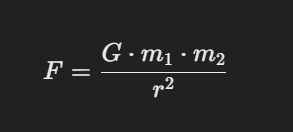
In mathematics, if you write the formula incorrectly, such as omitting ( G ) or squaring ( r ) incorrectly, the equation fails to represent the gravitational relationship accurately, just like incorrect syntax in programming causes errors.
Example Usage
C# Variable Syntax
// Syntax
DataType VariableName = Value

// Example my name
string name = "Kai Jotic"

// Example total networth ko 20 pesos 😆
int networth = 20;
2. Creating Variables
Creating variables can be done in various ways depending on the logic you're trying to achieve and the programming language you're using. For simplicity, let's focus on a common approach.
Declaration,InitializationorCombination of both
Declaring Variables
-
When you declare a variable, you create a placeholder for data, but if you don't assign a value, the variable is considered uninitialized.
/*
* Sa madaling salita wala pa tayong nilagay na value sakanya pag
* gantong variable lang ginawa mo ang tawag sa english non is `Declaration`
*
* Gumawa ka ng variable pero wala siyang laman or value in english.
*/

// Example 1 ⚔️
int damage;

// Example 2 🧪
string itemName;

// Example 3 🤔
bool isAlive;
Initializing Variables
- Variables must be assigned a value before they are used.
/*
 * Pag ang scope ng varaible mo ay local variable kailangan lagyan mo muna siya ng value bago mo
 * siya gamitin or in English ang term na ginagamit pagnaglalagay tayo ng value sa variable is
 * `Initialization`
 */

// Example 1 ⚔️
damage = 28;

// Example 2 🧪
itemName = potion;

// Example 3 🤔
isAlive = true;
Example
-
Declation and Initialization
// Example 1 ⚔️ int damage; // declaration damage = 28; // initialization // Example 2 🧪 string itemName; // declaration itemName = potion; // initialization // Example 3 🤔 bool isAlive; // declaration isAlive = true; // initialization -
Combination of Both
// Example 1 ⚔️
int damage = 28; // declaration + initialization

// Example 2 🧪
string itemName = potion; // declaration + initialization

// Example 3 🤔
bool isAlive = true; // declaration + initialization
The behavior of a variable varies depending on its scope. If a variable is declared in the global scope, the compiler will automatically assign a default value to it, even if you don't specify one.
The varaibles used in the examples about are all local variable.
for more details about variable scope. see Varaible Scope
3. Data Types
In C# we have two types of DataType the Non-Primitive Types (Value Types) and the Primitive Types (Reference Types)
Value Types:
int- Integer numbers (e.g., 1, 100).float- Decimal numbers (e.g., 1.23f).double- Larger decimal numbers (e.g., 1.2345).char- Single character (e.g., 'A').bool- Boolean values (trueorfalse).
Reference Types:
string- Text (e.g., "Hello").object- Can hold any data type.custom class- e.g.Player,LogicManager.
for more details about DataTypes see https://www.w3schools.com/cs/cs_data_types.php (opens in a new tab)
4. Variable Naming Rules
A. Use Only Letters, Numbers, and Underscores (No Spaces)
Valid Example:
string customerName = "John Doe";    // Valid: Uses only letters and an underscore
int totalAmount = 200;               // Valid: Uses only letters and numbers
double account_balance = 450.75;     // Valid: Uses an underscore between words
Invalid Example:
string customer name = "Jane Doe";  // Invalid: Contains a space
double account-balance = 300.50;    // Invalid: Contains a hyphen
B. Cannot Start with a Number
Valid Example:
int userAge = 25;                   // Valid: Starts with a letter
double totalPrice = 100.50;         // Valid: Starts with a letter
Invalid Example:
int 123abc = 50;                    // Invalid: Starts with a number
double 2021Price = 500.25;          // Invalid: Starts with a number
C. Must Not Use C# Reserved Keywords
Valid Example:
string userName = "Alice";          // Valid: Not a reserved keyword
bool isActive = true;               // Valid: Not a reserved keyword
Invalid Example:
string class = "Math";              // Invalid: 'class' is a reserved keyword
int int = 10;                       // Invalid: 'int' is a reserved keyword
D. Be Descriptive (Prefer customerName over cn)
Valid Example:
string customerName = "John";       // Valid: Descriptive variable name
int totalAmount = 500;              // Valid: Descriptive and readable
bool isOrderComplete = true;        // Valid: Descriptive and meaningful
Invalid Example:
string cn = "John";                 // Invalid: Not descriptive
int amt = 500;                      // Invalid: Not descriptive
bool io = true;                     // Invalid: Not descriptive
Complete Example Using All Rules
Code
using System;

class Program
{
    static void Main()
    {
        // Valid variables following all naming rules
        string customerName = "Sarah";
        int totalAmount = 500;
        double account_balance = 1000.75;
        bool isActive = true;

        // Outputting the values
        Console.WriteLine($"Customer Name: {customerName}");
        Console.WriteLine($"Total Amount: {totalAmount}");
        Console.WriteLine($"Account Balance: {account_balance}");
        Console.WriteLine($"Is Active: {isActive}");
    }
}
Output
Customer Name: Sarah
Total Amount: 500
Account Balance: 1000.75
Is Active: True
5. Variable Scope
The behavior of a variable depends on its scope. When a variable is declared in the global scope, the compiler automatically assigns it a default value, even if you don't initialize it explicitly.
/*
 * Sa madaling salita, lahat ng variable na nasa loob ng 'functions', 'Constructor',
 * 'Object Initializer', at 'Parameter' ay tinatawag na local variables.
 * Sa kabaligtaran, lahat naman ng variable na nasa labas ng mga ito ay tinatawag na global variables.
 *
 * Ang mga global variable ay may default value kahit hindi mo pa sila ini-initialize,
 * samantalang ang mga local variable ay walang default value maliban kung ikaw mismo
 * ang mag-aassign ng halaga.
 */

public class Program
{
    // Global variable (field) declared outside of any method
    public float money;

    public static void Main(string[] args)
    {
        // Local variables declared inside the method
        int damage;  // Example 1: Local variable of type int
        string itemName;  // Example 2: Local variable of type string
        bool isAlive;  // Example 3: Local variable of type bool
    }
}
Global Variable Default Values
When global variables are declared without explicit initialization, the compiler assigns them default values. Here are the default values for common data types:
| Category | Data Types | Default Value |
|---|---|---|
| Integral Numbers | int, long, etc. | 0 |
| Real Numbers | float, double, etc. | 0.0 |
| Character | char | '\u0000' (null character) |
| Boolean | bool | false |
| Reference Types | string, object, etc. | null |
Example of a Local Variable
public static void Main(string[] args)
{
    // Example of a local variable
    string name;  // Local variable with no initial value
}
In this example, the name variable is local to the Main method and cannot be accessed outside of it.
Example of a Global Variable
internal class Program
{
    // Example of a global variable (field)
    public string name;

    static void Main(string[] args)
    {
        // Access the global variable 'name' within the method
    }
}
6. Constants
- Constant Variables: Values that do not change.
const float Pi = 3.14f; - Use
constto declare constants.
7. Read-Only Variables
- Values can only be assigned during declaration or in a constructor.
readonly int age;
8. Type Inference with var
- The compiler infers the type based on the assigned value.
var age = 25; // Compiler infers 'int'
9. Nullable Variables
- Variables that can hold
nullvalues.int? age = null; // Nullable integer